
iOS · Voice recorder
Every take,
already labeled.
HiSS speaks the date, time, and label into the start of every recording, then transcribes it on-device. Light AAC files, no account, no cloud round-trip.
The app
A voice memo with a stamp baked in.
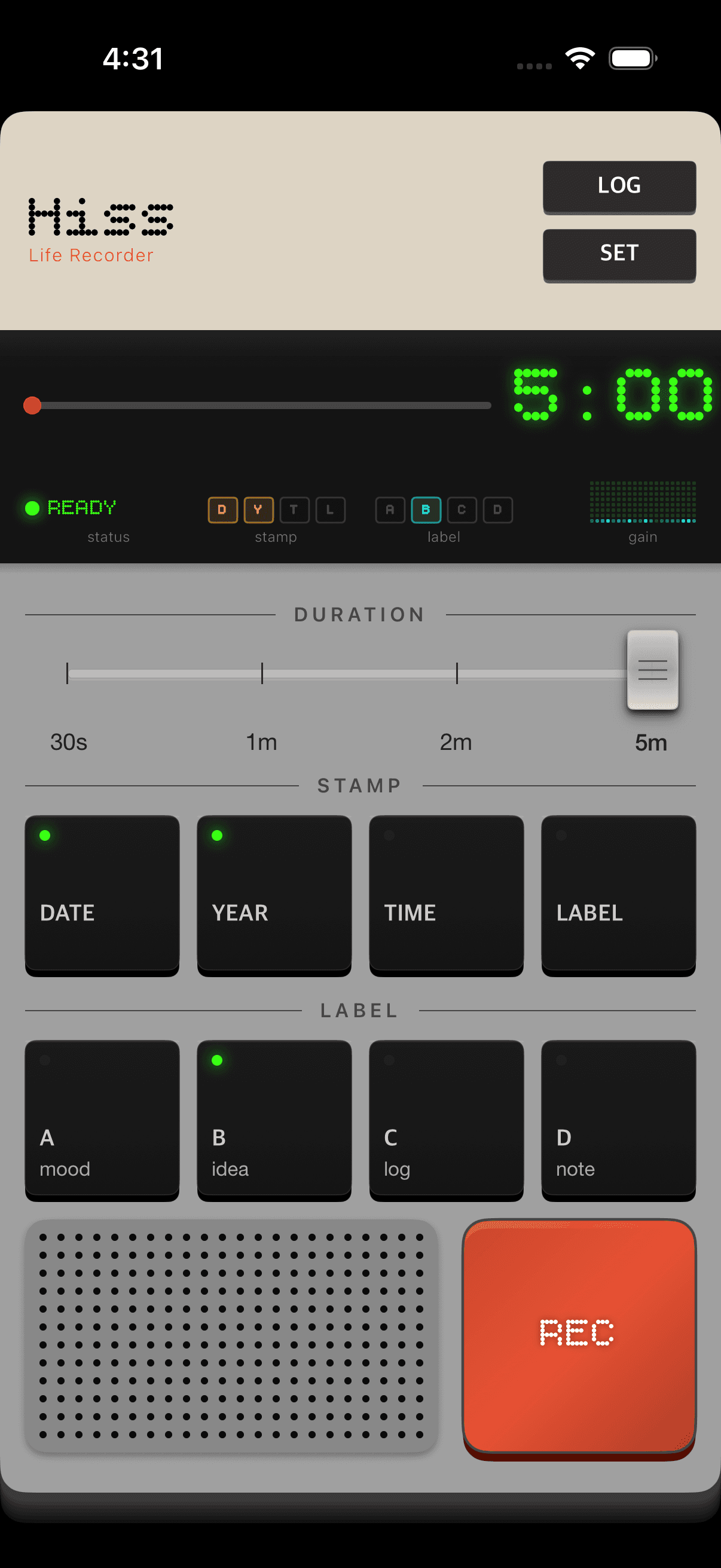
Press REC. The stamp is already voicing.
No warm-up. The date, time, and label render in parallel with the mic — the file is stamped by the time you stop.
What makes it different
The plain voice recorder, upgraded quietly.
Every feature earns its place. No gradients, no glow, no signup. Just the parts a voice memo actually needs — plus a few that turn a folder of clips into a searchable archive.
Spoken stamps, in the audio
Date · year · time · label are TTS-rendered into the head of the file. No manual labeling later.
Transcription, on device
Apple Speech — the same engine built into iOS — transcribes on-device. No network call, no account. English, Korean, Japanese, Chinese.
Multiple export formats
Audio, plain text, Markdown for Obsidian/Notion, CSV for spreadsheets — or copy the transcript straight to your clipboard.
Light and private
≈ 140 KB per 30 s. No account, no analytics, nothing leaves the phone. Interruptions auto-save.
The stamp
Filename dies. The voice doesn't.
You choose what gets voiced — Date, Year, Time, Label. HiSS speaks it into the first second of the file. Rename it, move it, hand it to someone in a year — the recording still tells you when it was, what it was for, and where it happened. No metadata to lose.
You choose
Toggle Date / Year / Time / Label per session.
In the audio
The stamp is baked into the .m4a, not the file metadata.
Review by ear
Skim months of memos in seconds — the stamp is the anchor.
Features
Built like an instrument, not an app you swipe past.
The whole app follows one rule — every screen must answer a real recording question. Duration. Label. Location. Language. Nothing decorative.
Instant capture with stamped context
Press REC. The date, time, and label are spoken into the start of the file while the mic is already recording. No warm-up, no dialog.
Transcripts you can trust, in your language
Apple Speech — the same on-device engine built into iOS — turns every recording into text. No network call, no account. Force English, Korean, Japanese, or Chinese for accuracy, or let it auto-detect. Long recordings save partial results if anything interrupts.
"Meeting notes for the voice pipeline design review."
"회의 노트 — 보이스 파이프라인 디자인 리뷰."
"会議メモ — 音声パイプラインの設計レビュー。"
Apple Speech · on-device · no network call
Voices in your language, not just English
The stamp speaks your device language automatically, using downloaded Enhanced or Premium iOS voices. Korean, Japanese, Chinese, and English are all first-class.
Export as audio, text, Markdown, or CSV
Multi-select, then pick a format — or skip the file and copy the transcript straight to your clipboard. Markdown drops into Obsidian, Bear, or Notion with frontmatter and tags; link it from a daily note and it's just another connected part of your vault. CSV opens in Numbers or imports into a database.
The original recording, unchanged.
Human-readable transcript + meta.
Obsidian / Bear / Notion, with tags.
Numbers · Excel · databases.
How it works
One tap. The rest is baked in.
The stamp is rendered while the mic is capturing — no serial dialog. Everything merges to a single AAC file, then transcription runs in the background if you want it to.
Mic + TTS stamp start in parallel.
TTS head + mic tail → single PCM.
22 kHz mono, 32 kbps. ≈ 140 KB / 30 s.
Apple Speech on-device (optional).
Use cases
For people who log by voice.
The stamp turns voice memos into a scannable timeline. Light AAC files (~140 KB per 30 s) make daily use guilt-free — a year of hourly notes fits comfortably on your phone.
Hourly work logs
Speak once an hour about what happened. The time stamp becomes the timeline; the transcript becomes the diary.
Fieldwork
Observations with real-time and city name baked in — no manual timestamping, no writing while gloved or muddy.
Research notes
Interview snippets, lab observations, half-formed hypotheses. Later, search by phrase across the whole archive.
Travel
Turn Location on — the city gets stamped into every clip. Retrace a trip by sound months after you're home.
Everyday
≈ 140 KB per 30 s. Record freely — a full year of daily memos fits in under 50 MB.
Premium · $4.99
One tap unlocks the extras.
The core is free — recording, stamping, on-device transcription with Apple Speech, TTS stamps in every language, and every export format: audio, text, Markdown, CSV, or straight to your clipboard. Premium is purely the finish.
Four additional themes
Mono · Iris · Ember · Dusk. Alternate personalities for the same instrument.
iCloud Sync
Your recordings and transcripts on every device signed into your Apple ID.
One-time $4.99. No subscription. No account.
Privacy
Nothing leaves the phone unless you share it.
Recordings live in the app's own storage. Transcription runs locally via Apple Speech — no network call, no account, no telemetry. If a phone call or alarm interrupts a session, the file is saved up to that point automatically.
Download
HiSS — Life Recorder for iOS.
iOS 16 and later. Optimized for Apple Neural Engine. The core is free; premium unlocks extra themes and iCloud sync.
Free · Premium $4.99 one-time